Cisco
Helping network teams see where the problem is.
vAnalytics gave enterprise network teams their network data, but finding the cause of a slow or failing connection meant reading raw tables and tangled charts. I redesigned how they find the problem, and how product line managers (PLMs) set up who can see what.
Role
Sole designer
Team
30 engineers
Users
Network operators, architects and admins; internal product line managers (PLMs)
Status
Prototypes, presented to upper management
2
Deciding who sees what and where it landed
1
Finding the problem
CHAPTER 1
Finding the problem
Network diagnosis: from "something is slow" to which tunnel, which device and which provider.
BEFORE
The data was there, but the answer wasn't
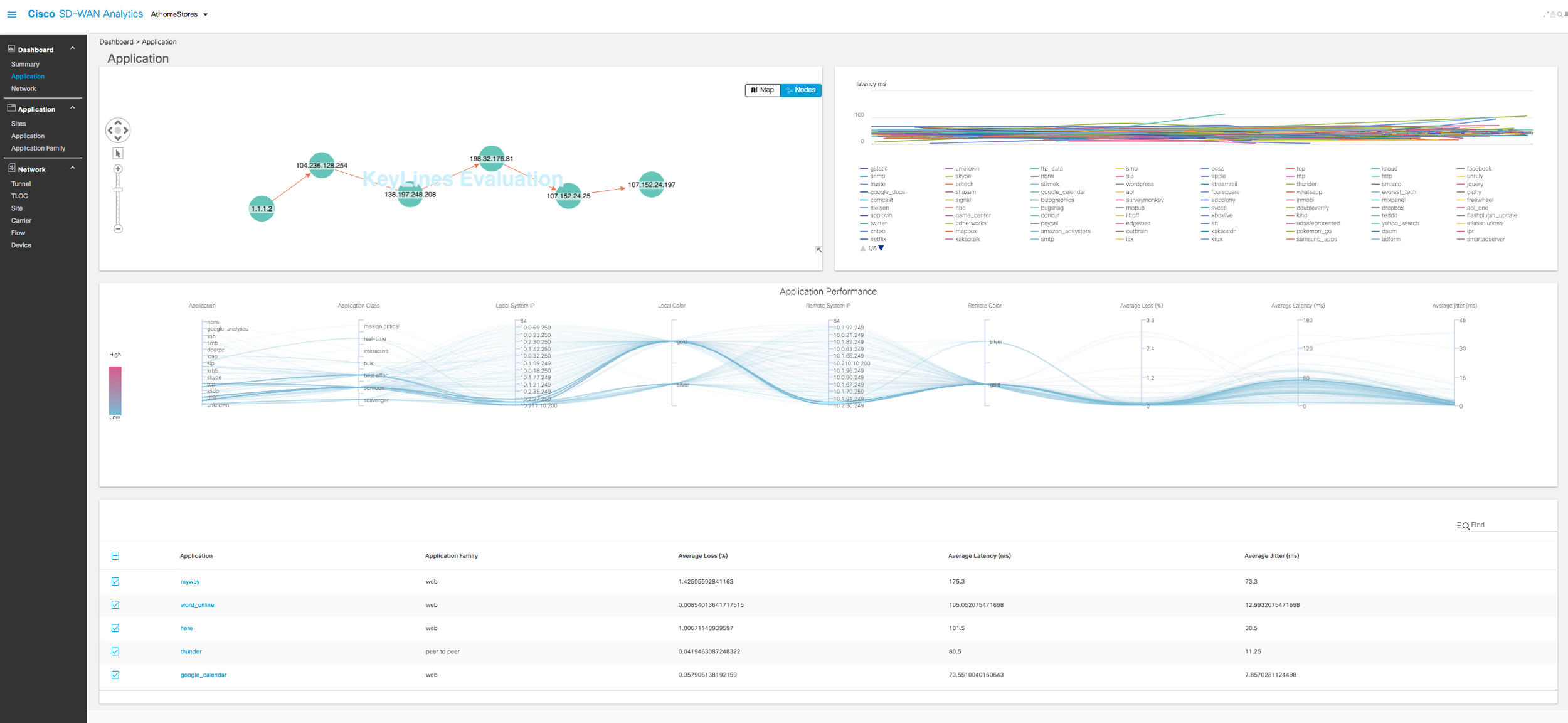
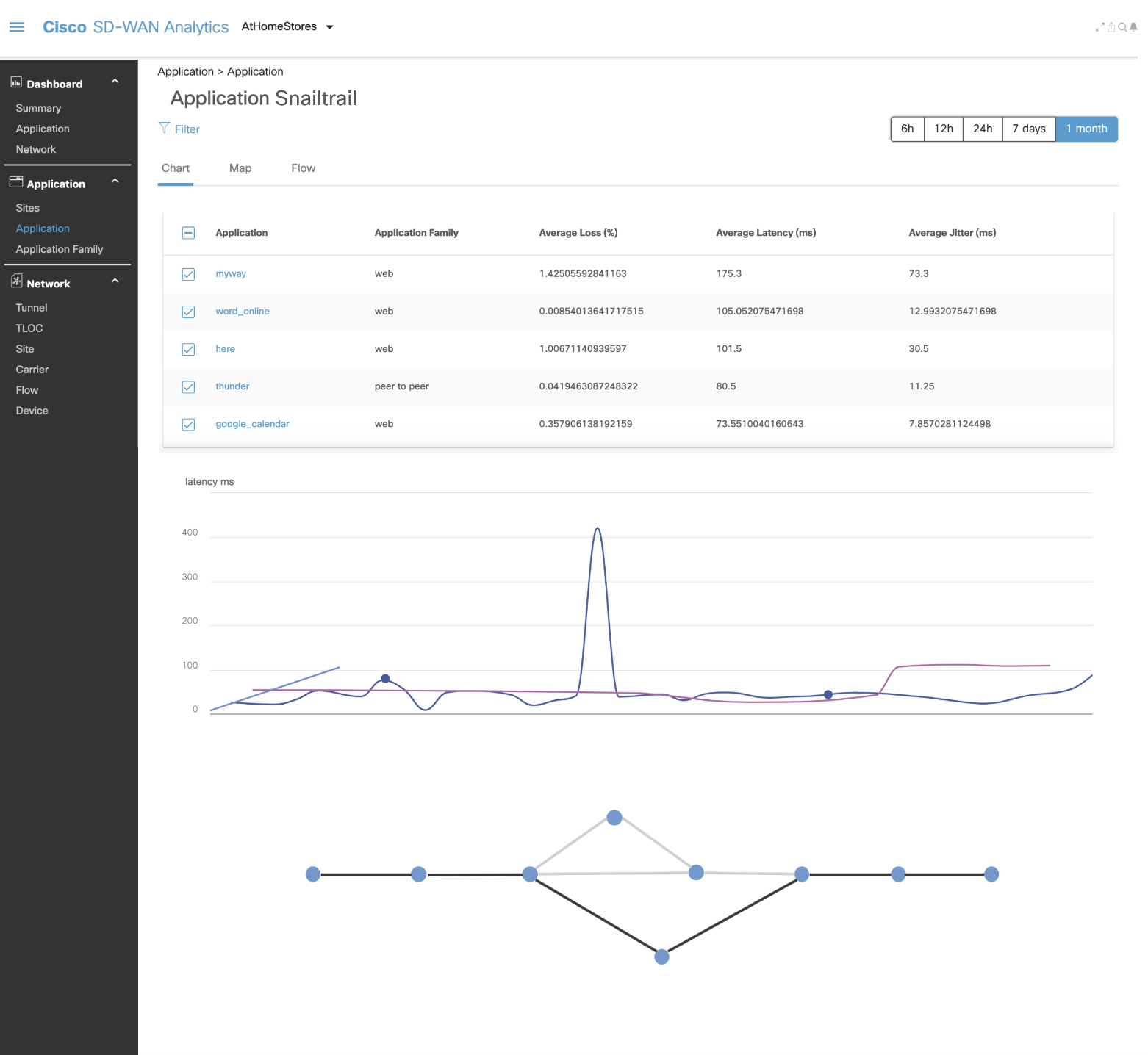
The old screens put every application on one line chart and every number in a table. To find a problem, a network operator had to read rows of decimals and guess which path they belonged to.
WHAT USERS NEEDED
Start from the questions, not the data
Customer feedback came from current Cisco users, collected by Sales and passed to our team. I turned those pain points into the questions a network person asks, in order.
How many devices aren't performing?
How is each tunnel doing?
Where is the problem coming from?
What are my options, and can my connection handle them?
Each screen I designed answers one of those questions.
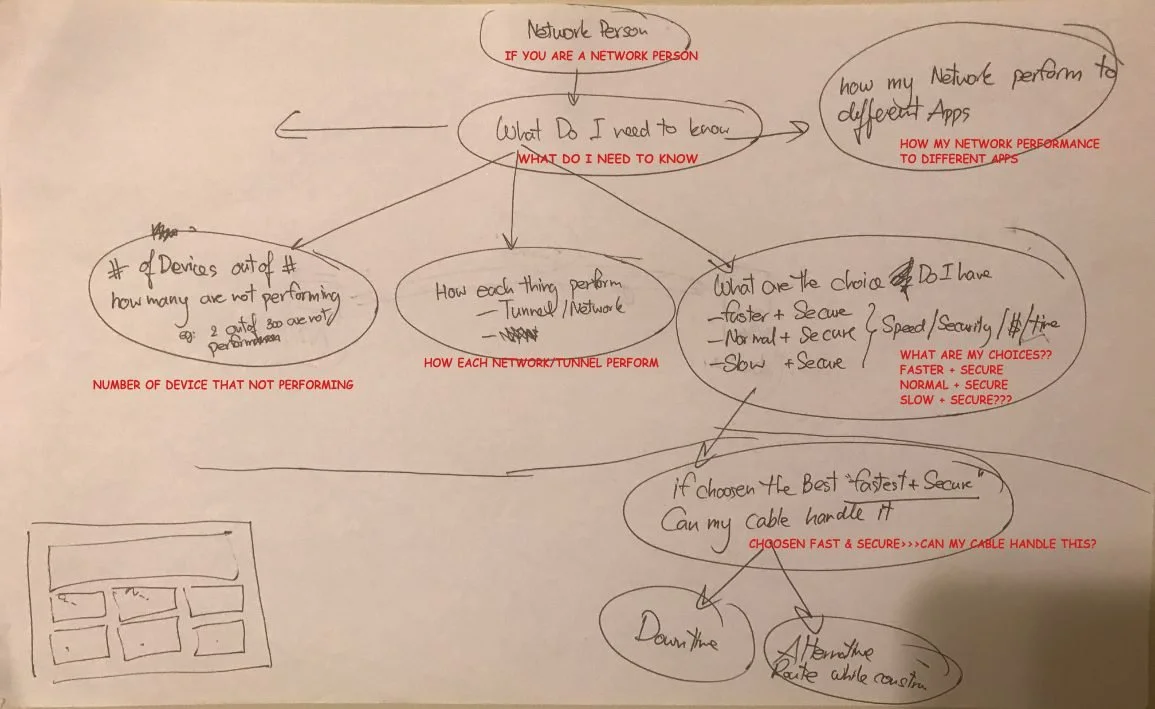
My question map, built from the customer feedback.
THREE DECISIONS
Make the problem visible before anyone reads a number
DECISION 1
Summary first, detail on demand
The dashboard opens with the answer to "how bad is it": tunnels lost, devices that need action, and the trend since the last 24 hours. Every chart below it can be filtered in place.
Titles double as filters: switch a chart from loss to latency or jitter
Time filter from the past hour to a year
Share a view with a teammate from the chart
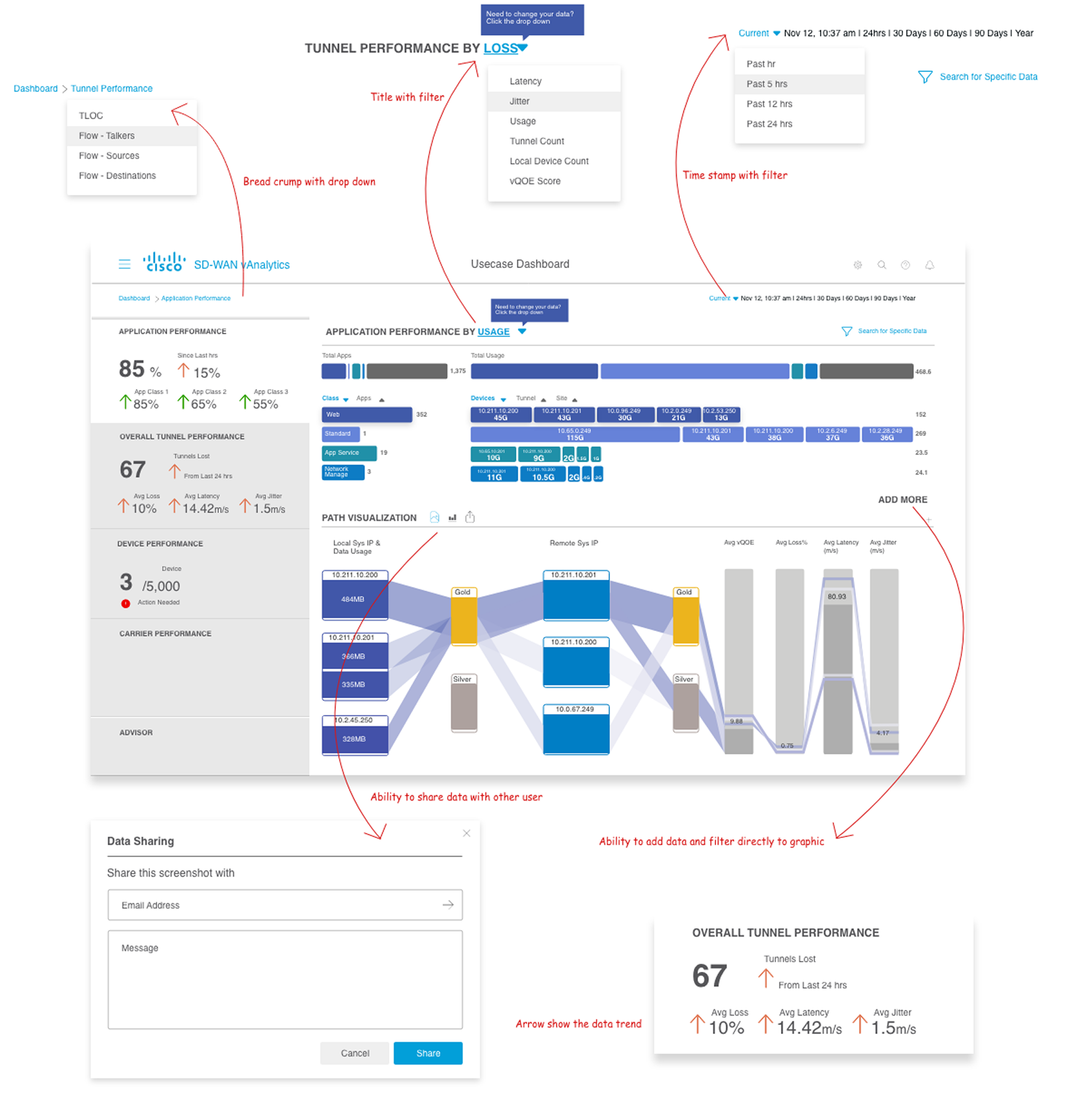
Note: these 2019 prototypes label latency and jitter as “m/s.” The correct unit is milliseconds (ms).
DECISION 2
Trace the path, not the row
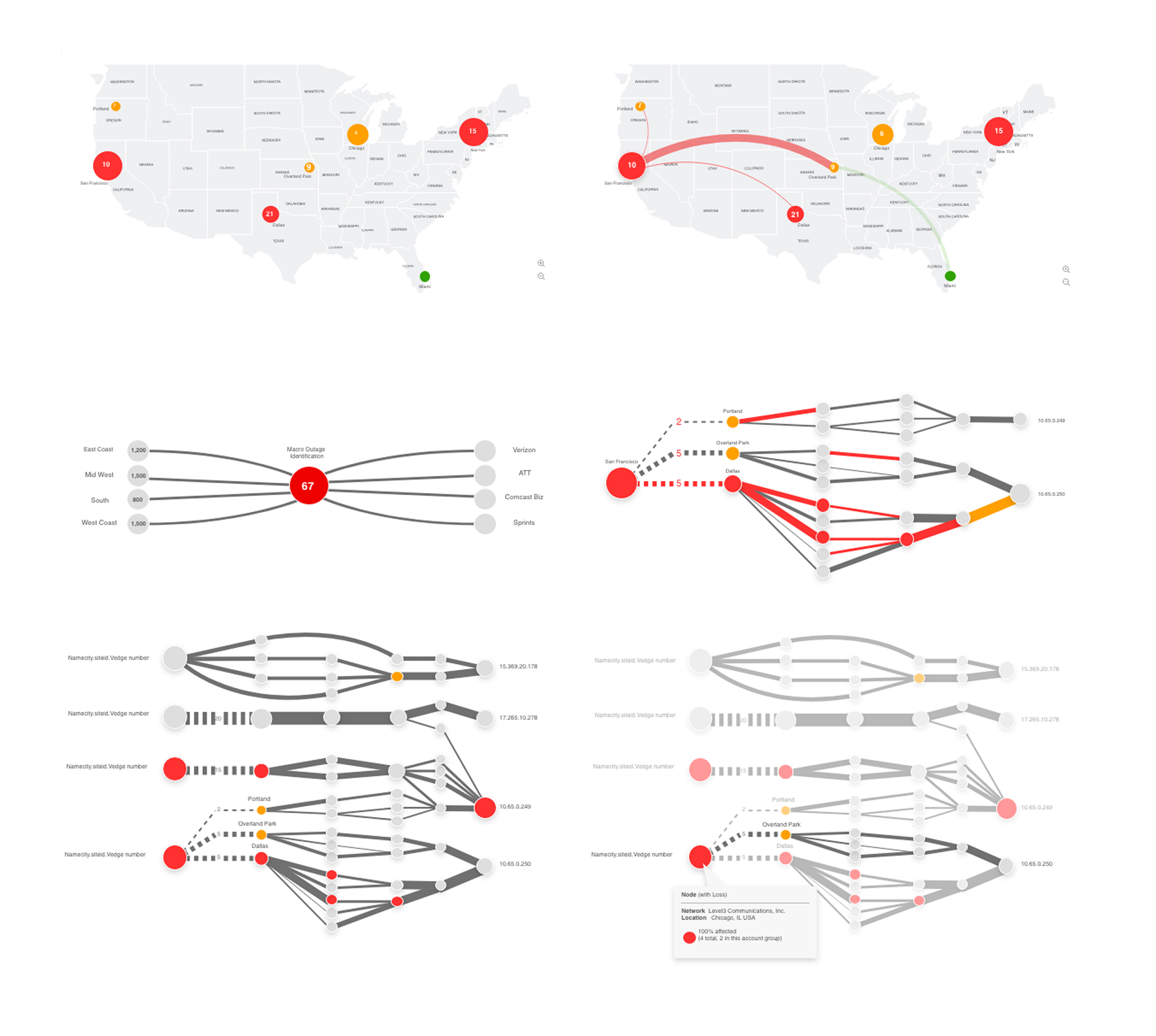
The map and the snail trail work together. Pick a site on the map and the snail trail shows every hop from that site to its destination, so the operator follows the path to where it breaks.
Bubble size and color show how severe a site or tunnel is
Line weight and dashes show the condition of each connection
Provider colors double as the legend
Click a bubble to isolate its path; hover for details
DECISION 3
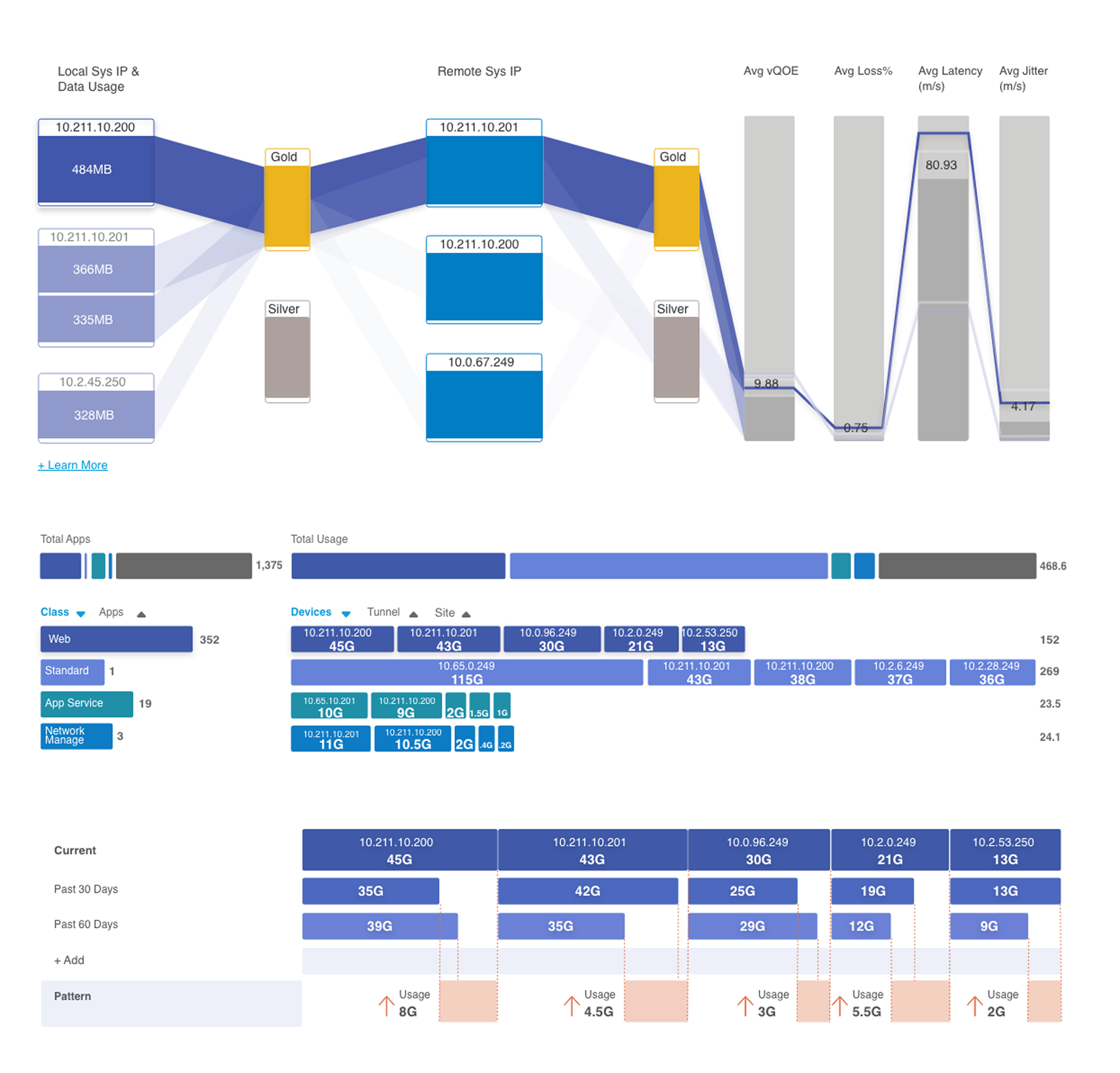
Show cause and effect in one view
I replaced the raw table with a Sankey diagram. It connects the local device, its service tier and the remote device to the result: quality, loss, latency and jitter. Clicking a device isolates its path, so the operator sees which connection is pulling the numbers down.
A second view shows which applications use the most data, by device, and compares the past 30 and 60 days so teams can spot a pattern before it becomes an outage.
CHAPTER 2
Deciding who sees what
Onboarding enterprise clients without hand-coding.
THE PROBLEM
Accounts nested inside accounts
Clients weren't a flat list. A service provider could have its own partners, those partners had their own enterprise clients, and each enterprise had overlays with their own roles. Every level had different permissions and saw different data.
So each new client went to engineering to be coded and mapped manually.
How might a PLM onboard any client, at any level of the hierarchy, without needing an engineer?
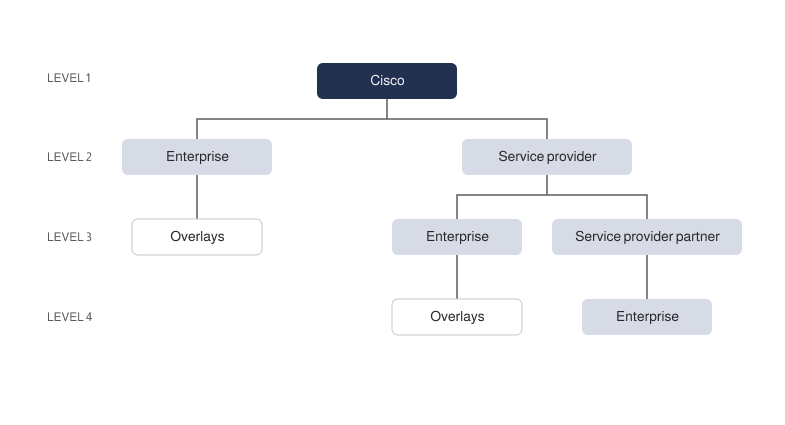
The account hierarchy, mapped with the engineering leads before any screen.
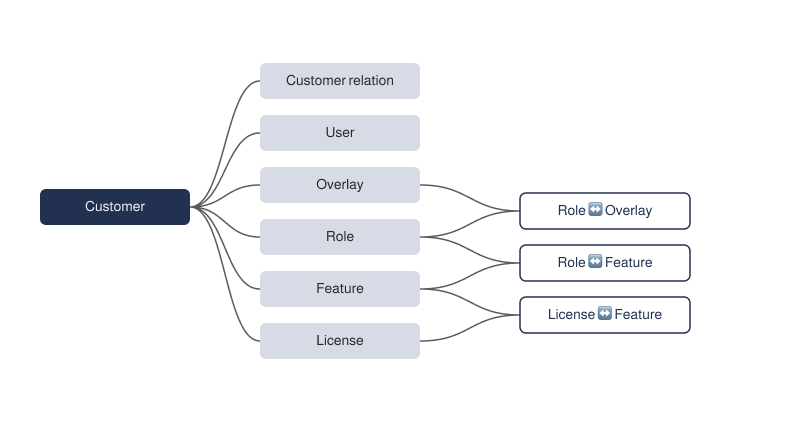
The data model. The three links on the right became the matrix screens below.
DECISION 1
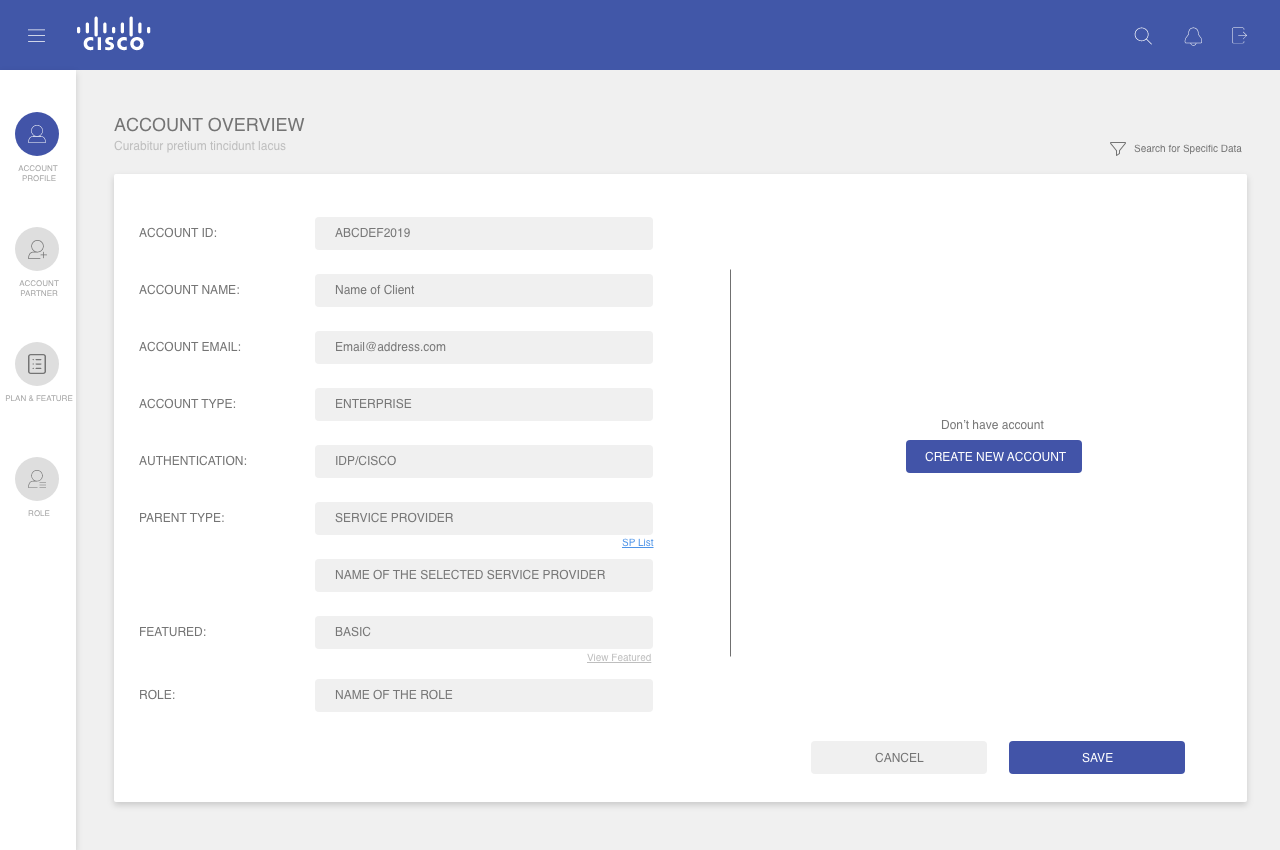
The parent decides the form
One account form for every type. Choosing a parent type opens the matching list in place, and the new client appears in the account partner list once saved.
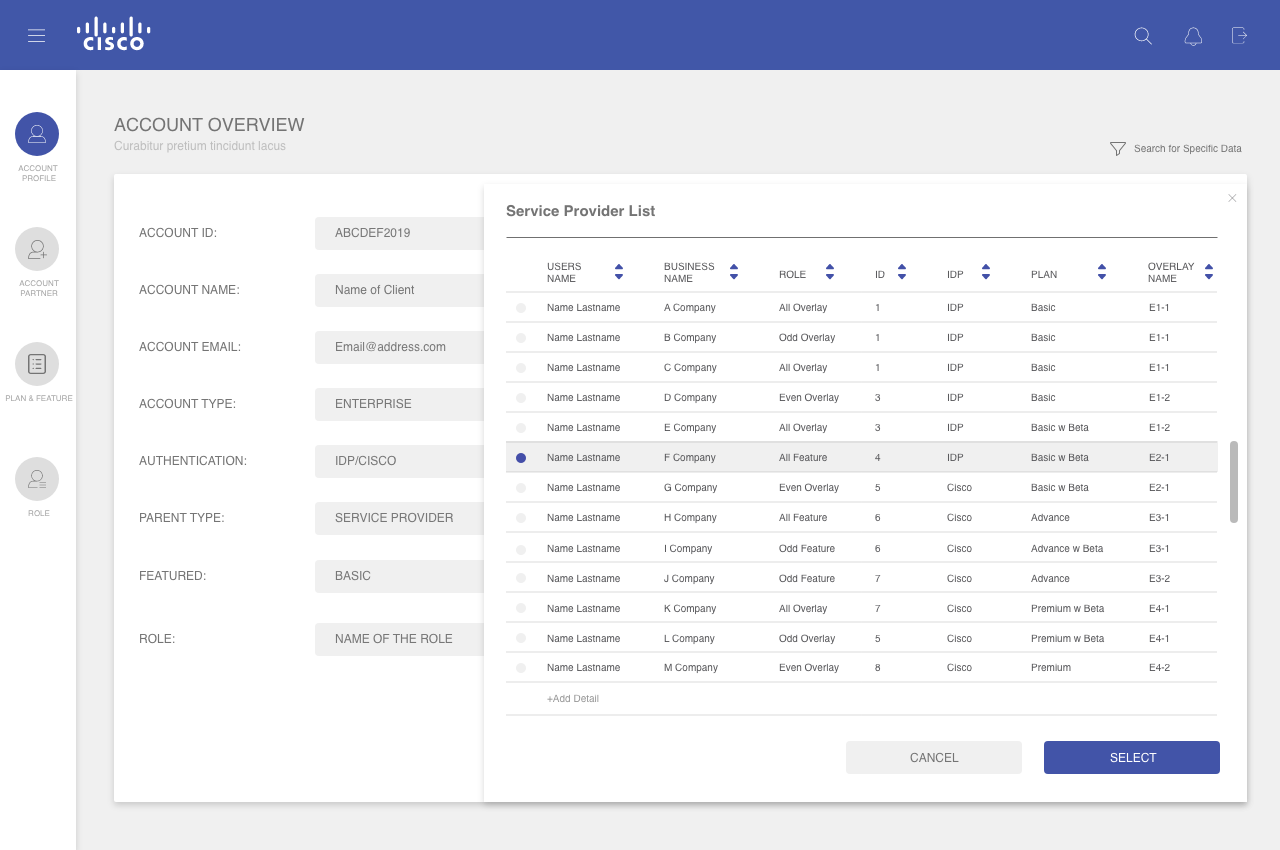
DECISION 2
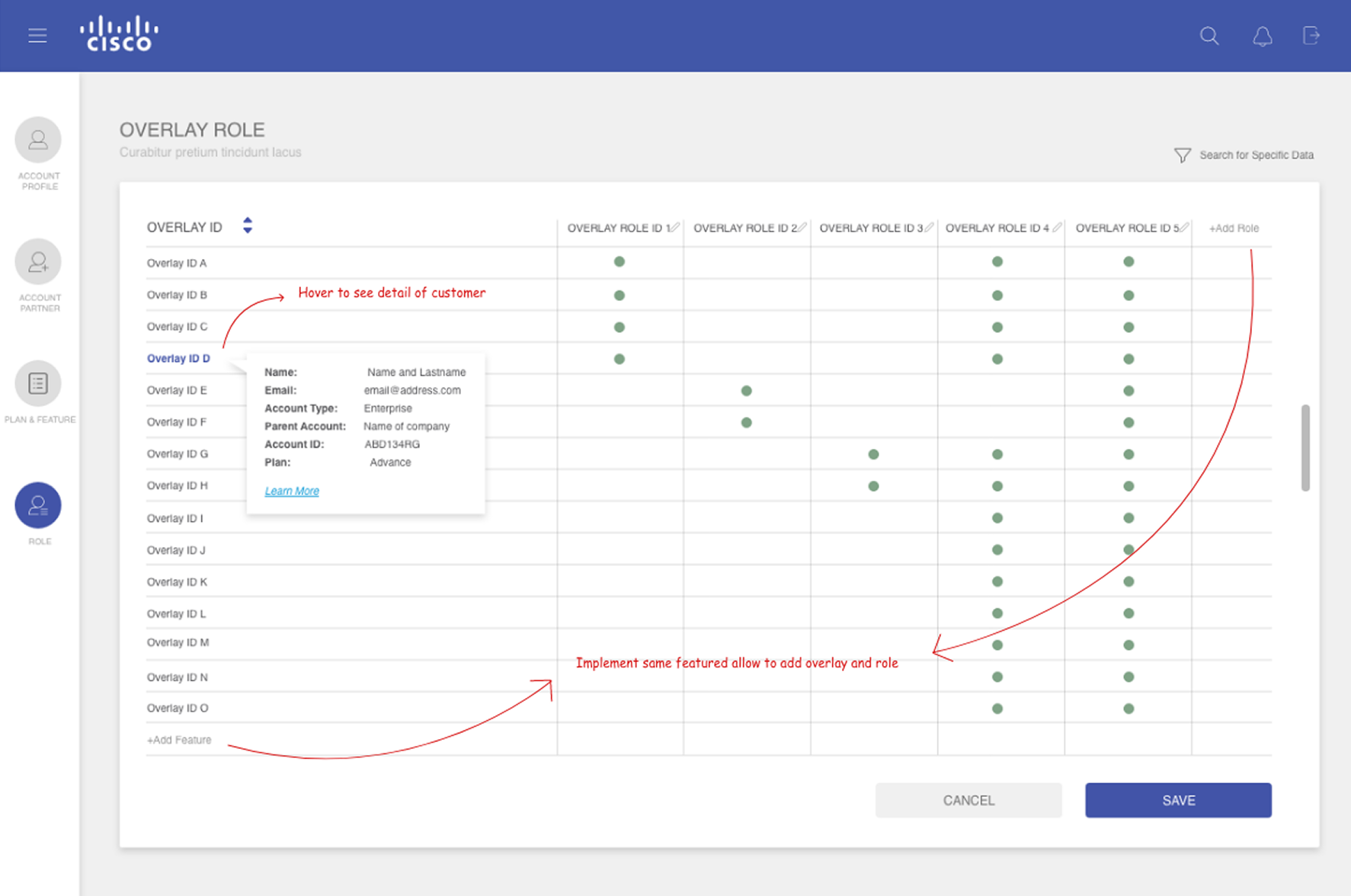
One matrix pattern, used three times
Plans, feature roles and overlay roles all answer the same question: which things go with which. One matrix, so PLMs only have to learn it once. Add a plan or role in place, copy a plan, and set trial dates so higher-tier customers can try a new widget.
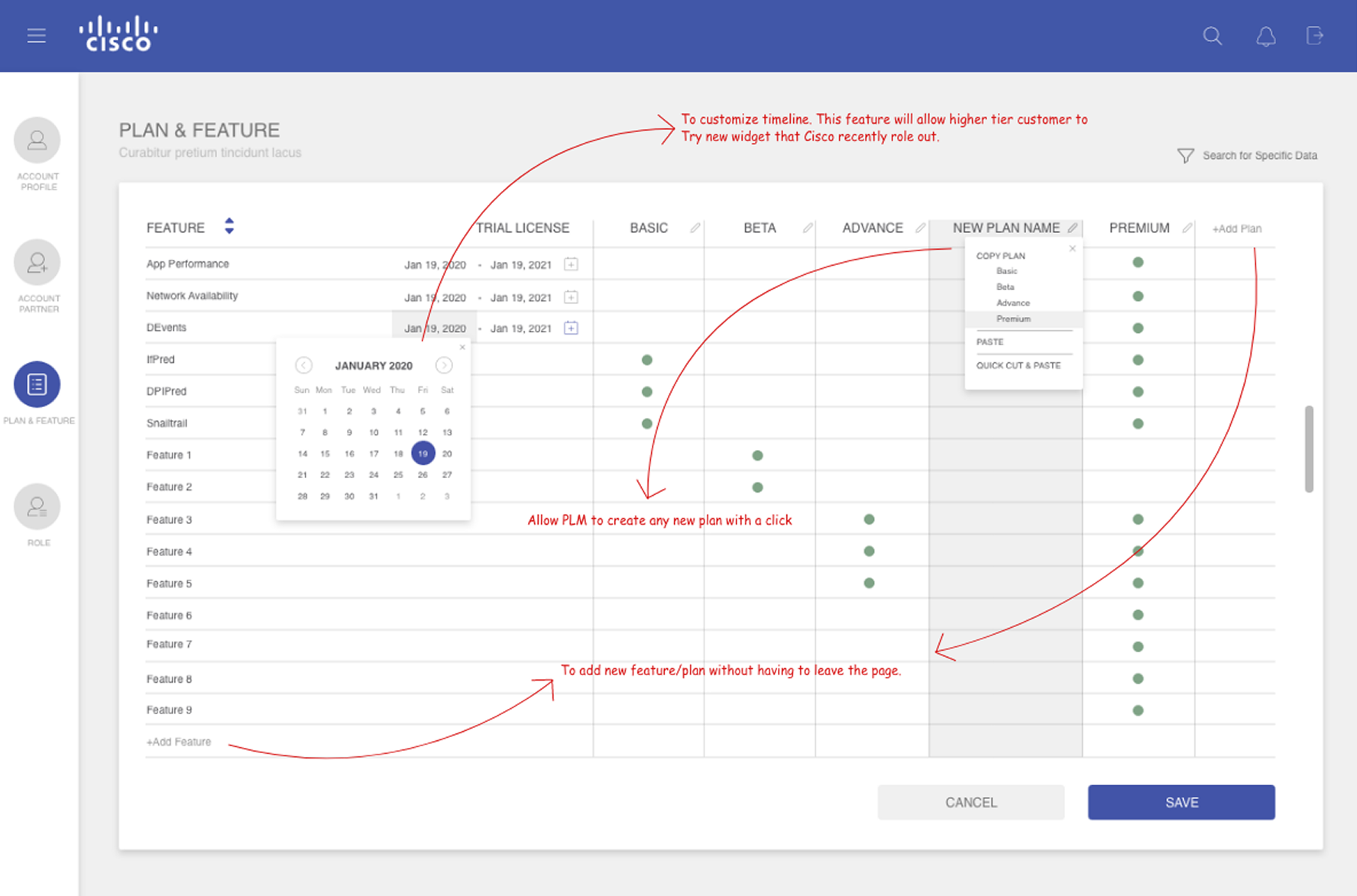
DECISION 3
Each role edits only what it owns
With this many layers, each role sees and edits only the fields its permission allows. That keeps the backend tidy and avoids manual fixes.
WHERE IT LANDED
Prototypes that set the direction.
Designed, prototyped and presented to upper management
Both chapters stayed at the prototype stage. I shared them with upper management as the direction for vAnalytics. My time at Cisco ended before any launch
LOOKING BACK
What I'd do today –
From reactive to proactive: catch the pattern before it becomes the problem.
I'd test with network operators directly instead of hearing their pain points through Sales. Getting time with customers is hard, but that's a problem to solve, not a reason to skip it. I'd measure how quickly operators notice an issue, how fast it gets resolved, and how they use the forecast view to spot similar patterns early, so teams can act before an outage instead of after it.
Thank you so much!
Explore My Other Projects
-
![]()
Enhancing Engagement Through Smarter Ad Design
Led a transformation of Samsung Ads’ interactive TV ad experiences—from replicating industry norms to defining a differentiated user-centric platform.
-
![]()
Vision AI to Sport HUB: setting the rules for AI on the biggest screen in the home
Viewers pick up their phone to check a score, a product or a smart-home alert, and miss the show. I designed Vision AI for Tizen and wrote the rules for how AI appears while someone is watching. Sport HUB brings those rules to live sports: ask about the game, shop what's on screen or check on home without leaving the match.
-
![]()
Ad Experience System
Ad Experience System: one design language for TV Plus, Tizen Home and microsites
-
![]()
CPX Campaign – Powering Scalable Performance Growth.
Led the evolution of CPX into a scalable performance platform, expanding support for new ad formats and advertisers while maintaining operational efficiency and enabling real-time optimization.
-
![]()
Stay Safe, Stay Informed with Navify
Roche Information Solutions: Delivering Integrated Digital Solutions for the COVID-19 Era.
-
![]()
Cisco · SD-WAN vAnalytics
Helping network teams see where the problem is. vAnalytics gave enterprise network teams their network data, but finding the cause of a slow or failing connection meant reading raw tables and tangled charts. I redesigned how they find the problem, and how product line managers (PLMs) set up who can see what.
-
![]()
Brand Engagement with Fike
Created immersive marketing content and internal resources—from 3D visuals to white papers—that elevated brand engagement, strengthened team readiness, and reinforced strategic brand consistency.